What is a virtual phone number? How to keep your personal number private


Most online services require you to provide a phone number when signing up, usually to confirm you’re a real person and not a bot. While this is often necessary, it can raise concerns about privacy and how your number might be used.
One way to reduce the risk of your personal number being shared, reused, or exposed is to use a virtual phone number, an internet-based number you can use in place of your real one.
What is a virtual phone number?
A virtual phone number is a telephone number that isn’t tied to a specific location, device, phone line, or SIM card. Instead, it routes calls to different endpoints, such as smartphones, laptops, desk phones, other phone numbers, or apps that let you make and receive calls on a computer.
Virtual phone number vs. traditional mobile phone number
The main difference between a virtual and a traditional phone number is that a traditional number is tied to a SIM card and works primarily on the device that holds that SIM. Here’s a more detailed comparison:
| Virtual phone number | Traditional mobile phone number | |
| Operator | VoIP and cloud providers | Mobile carriers |
| Setup | No physical installation required; runs over the internet | Requires a SIM card and a compatible device |
| Scalability | Multiple numbers can be assigned to a single device | Requires additional devices or lines for each number |
| Location | Location-independent, as it’s cloud-based | Tied to a SIM card and carrier network |
| Calls | Can be answered on any internet-connected device | Can be answered anywhere with cell service |
| Call quality | Depends on internet speed and stability | Depends on cellular network coverage |
| Routing and scheduling | Highly customizable | Available but often limited and hardware-dependent |
How does a virtual phone number work?
Virtual phone systems run on cloud infrastructure and Voice over Internet Protocol (VoIP) technology.
When a call is placed, VoIP first uses a signaling protocol to negotiate the call between endpoints and handle setup and teardown. Once the session is established, VoIP samples the caller's voice, compresses it, and breaks it into data packets.
From here, each packet travels independently over the internet, and then reassembles at the destination in the correct sequence to reproduce the original audio.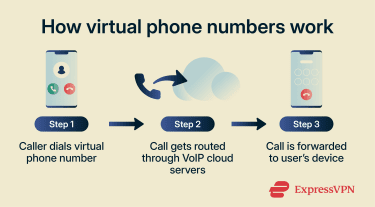
How calls are routed to your devices
When someone calls a virtual phone number, the process begins in the public switched telephone network (PSTN), a global system of interconnected telephone networks operated by carriers and telecom providers.
The PSTN identifies the number range and forwards the call to the operator who manages that range. The provider’s infrastructure receives the call and performs a real-time lookup against routing logic configured for that number.
This routing logic is essentially instructions that tell the system how to handle each call based on conditions the user defines, such as:
- Assigning calls to specific individuals or teams based on who is available.
- Routing based on the caller's geographic location, for example, sending local calls to a regional office.
- Applying time-based rules, such as routing to one device during business hours and voicemail after hours.
- Redirecting calls to another device or number if the primary destination doesn't answer.
Once routing is resolved, the voice data is delivered to the selected device. Call quality can vary, but well-designed systems keep delays minimal.
If both the caller and the recipient use VoIP, the call may avoid the PSTN completely. In that scenario, the call travels from one provider's network to another entirely over the Internet. Carriers handle this differently, so it isn't guaranteed, but it’s possible.
How is text routed?
If the recipient is on a traditional mobile network, the message is converted into standard SMS format at the handoff point between the internet and the cellular network. If the recipient also uses a virtual number, it stays entirely on the internet.
Why virtual phone numbers work
All licensed virtual phone number providers receive number ranges from the same national regulators and official numbering authorities that assign regular numbers. They then assign individual numbers to end users from within those ranges.
E.164 is the international numbering standard that defines how those ranges are structured and allocated worldwide. It ensures numbers can be uniquely identified globally. This is what allows the PSTN to identify which provider is responsible for a given number and to route calls and messages to it accurately.
Note: Not all virtual phone numbers use the E.164 format internally. Some systems rely on local or proprietary numbering schemes, which are converted to E.164 when communicating externally.
Benefits of using a virtual phone number
Although it’s not necessarily unsafe to give out your real phone number, using a virtual number instead can help reduce unwanted messages and be useful in scenarios where you might want a second phone number.
Protecting your primary number
Many online services require a phone number during sign-up, usually for account verification or promotional messaging, and phone numbers shared with online services may be passed to advertisers or published in public directories. As a result, users might start getting scam or spam calls, robocalls, and spam texts, leading to frustration.
Virtual phone numbers help by directing spam or scam calls and messages to the virtual number. Meanwhile, your real number stays private and can remain your primary line for trusted contacts, such as friends and family.
Low-trust interactions
Using a virtual phone number can enhance safety when interacting on dating apps or classified marketplaces. Sharing real numbers can increase the risk of unwanted messages, especially when dealing with persistent or aggressive sellers, buyers, or matches.
Other advantages
In addition to privacy benefits, virtual phone numbers offer several practical advantages. Examples include:
- Managing multiple phone numbers without needing separate devices.
- Keeping business and personal communications separate.
- Using a number for short-term needs or one-time uses, such as free trials, listings, verification codes, discounts, or vacation rentals.
- Calling and texting over Wi-Fi or mobile data while traveling to avoid high roaming charges.
- Easily changing or discarding a virtual number whenever needed.
How to get a virtual phone number
Getting a virtual phone number is straightforward, though the exact steps may vary depending on the provider and your needs. In most cases, the process involves choosing a provider and plan, selecting your number, setting it up on your device, and customizing features if needed.
Note: Some providers support number porting, allowing you to transfer an existing phone number to their network.
Choose the right provider
Virtual phone services cater to different types of users, including individuals, freelancers, small to mid-size businesses, and large enterprises. As a result, providers are typically divided into consumer and enterprise-grade solutions.
Consumer services usually offer basic calling and texting features through free, ad-supported, or low-cost plans. In contrast, business-focused solutions provide paid, team-oriented plans with advanced features such as voicemail transcription, call routing to reduce wait times, and automated virtual receptionists.
Pick your number type and area code
When choosing a virtual phone number, most providers will ask you to select an area code. Once selected, you can choose a local number tied to that geographic region. Some business-oriented providers may also offer additional options, such as:
- Toll-free numbers, which callers can dial at no cost.
- International numbers tied to a specific country.
- Vanity numbers that spell out a word or phrase on the keypad.
Note: While some consumer-grade providers support international numbers, most of them only offer area codes in the U.S., Canada, and the U.K.
Set up calling, texting, and forwarding
Consumer-grade services usually require minimal setup. In most cases, you just download an app while choosing your virtual number or immediately after. Then, you grant it the necessary permissions to make and receive calls and messages.
Many providers also include built-in features that you can enable or customize, such as auto-replies when you can’t answer, voicemail forwarding, spam filtering, and automatic blocking of unknown callers.
Business-oriented services may require more configuration. After getting a virtual number, users might need to set up call flows to route calls and messages to the right devices, add team members, and assign numbers based on the team’s size. Some users may also want to configure advanced settings like call menus, custom greetings, routing rules, and business hours.
Limitations of virtual phone numbers
Virtual phone numbers solve real problems, but they're not a perfect replacement for a mobile number in every situation. Here's what to know before switching.
- Internet dependency: Virtual numbers rely entirely on your internet connection. A weak Wi-Fi signal or unstable data connection can result in dropped calls, audio lag, or poor call quality.
- Emergency calling: When you dial 911 from a mobile number, your carrier automatically transmits your location to emergency services. Virtual numbers don't do this by default. Most VoIP providers offer E911 service, but it requires you to register a fixed address with your provider in advance.
- Platform blocking: Many apps and websites detect and reject VoIP numbers during SMS verification. A virtual number won't work everywhere a mobile number would, so you'll likely still need your real number for certain sign-ups.
- Number recycling: When a virtual number is cancelled, some providers reassign it to a new user. That new user may then receive verification codes, messages, or calls intended for the previous holder. Reputable providers manage this carefully, but it's worth asking about recycling policies before committing to a provider.
Safety and legal considerations
While virtual phone numbers can help protect your privacy, they also come with their own security considerations and legal requirements.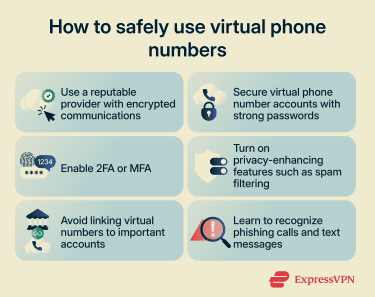
Privacy issues and solutions
Because virtual phone numbers rely on cloud and VoIP technology, they can be exposed to certain cyber threats. Common concerns include data being intercepted due to weak network security and providers logging calls or metadata.
However, internet-based infrastructure also enables strong security controls. Providers can implement measures such as encrypted communications, real-time monitoring for suspicious activity, and traffic filtering to block malicious calls.
That said, overall security still depends on the provider’s practices and how users manage their accounts. To better protect your privacy when using a virtual phone number, consider the following tips:
- Use a reputable provider: Look for a service that offers encryption to protect calls and messages. Also, review the provider’s privacy policy to understand how it handles and protects communication data and personally identifiable information (PII).
- Create strong passwords: Come up with logins that are at least 12 characters long, mix letters, numbers, and symbols, and don’t include common words or phrases. Additionally, consider using a password manager, like ExpressKeys, to securely generate, store, and use strong credentials.
- Enable extra identity checks: Most providers support login via two-factor authentication (2FA) or multi-factor authentication (MFA). These security features add additional verifications during login, making it difficult for malicious actors to take over your account if they compromise your password.
- Use privacy-enhancing features: Turn on extra security features if available. For example, enable options to filter spam calls and messages, block unknown callers, or use voicemails to screen incoming calls.
- Stick to low-risk use cases: Avoid linking your virtual number to sensitive accounts, such as banking or social media. Instead, use it for lower-risk activities like classified marketplaces, dating apps, or one-time sign-ups and account activations.
- Learn about phishing: Familiarize yourself with common phishing tactics carried out through calls and text messages. Avoid engaging with callers or senders who use aggressive or high-pressure language, impersonate trusted organizations or authorities, or request sensitive information, account access, or money.
Compliance with local laws
Using a virtual phone number is generally legal, as long as it’s provided by a legitimate service that complies with local regulations and major data protection frameworks, such as the General Data Protection Regulation (GDPR) or the California Consumer Privacy Act (CCPA).
In practice, this means providers must implement security measures to protect user data, notify affected users in the event of a breach, maintain transparent privacy policies, and offer ways to access, correct, or delete stored data.
FAQ
Do I have to pay for a virtual phone number?
Are free virtual phone numbers really free?
Can I use a virtual phone number on multiple devices?
Can I choose a local area code?
Can I port my existing number to a virtual phone service?