Expressvpn Glossary
Reverse DNS

What is reverse DNS?
Reverse Domain Name System (DNS) is the process of mapping an IP address back to a domain name, like www.expressvpn.com. It provides a method to verify the identity of a host using its IP address.
How reverse DNS works
A reverse DNS lookup starts with an IP address.
- The DNS system sends that IP to a section of the domain name server that stores records for reverse lookups.
- In that section, the system looks for a Pointer Record (PTR) that links the IP address to a domain name.
- If the PTR record exists, the lookup returns the domain. If it doesn’t, the lookup ends without a result.
To perform the lookup, the IP address has to be rewritten into a special format. For IPv4, the numbers are reversed and .in-addr.arpa is added at the end. For example, 203.0.113.45 becomes 45.113.0.203.in-addr.arpa. IPv6 uses the same approach but relies on the .ip6.arpa domain.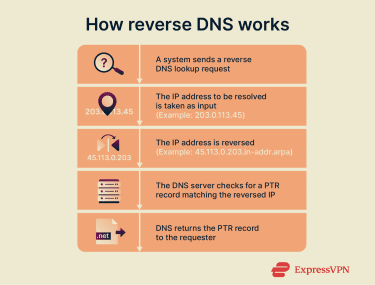
Why is reverse DNS important?
Reverse DNS supports several functions that rely on accurate identification of network hosts:
- Email authentication: Many mail servers check reverse DNS to confirm that a sending IP corresponds to a recognized domain.
- Network security: Security systems use reverse DNS to identify traffic sources and flag activity that does not align with expected domains.
- Troubleshooting: Administrators reference reverse DNS when tracing connections or analyzing unexpected network behavior.
- Trust verification: Services use reverse DNS to confirm the identity of external hosts before allowing certain types of communication.
Reverse DNS vs. forward DNS
Forward DNS works the opposite way of reverse DNS: it translates a domain name into an IP address. Forward DNS supports everyday web and application traffic, while reverse DNS supports verification, logging, and security functions. Used together, they provide a consistent way to identify both domains and the IP addresses behind them.
Security and privacy considerations
Reverse DNS can expose information about the systems using an IP address. PTR records sometimes reveal internal naming patterns or server roles, which can provide outsiders with details an organization didn’t intend to share.
Reverse DNS also has security limits. A PTR record only shows the name linked to an IP and doesn’t verify ownership or accuracy. Because these records can be incomplete or misleading, reverse DNS shouldn’t be used on its own to judge whether traffic is trustworthy.
 Support Center
  FAQ
FAQ  VPN Setup Tutorials