Expressvpn Glossary
Peripheral device
What is a peripheral device?
A peripheral device is a hardware component that expands a computer’s functionality. Many peripherals are external, though some may also be installed internally. Common functions include inputting information, outputting results, and storing data, but the device itself is not essential for the computer to operate.
In practice, though, most users need at least one input method and one output method to actually use a computer, whether through physical peripherals or remote access tools.
How does a peripheral device work?
Peripherals rely on hardware connections and software to function. The device first connects via a port or wireless link, such as a Bluetooth mouse pairing with a laptop. It then draws power from a data cable, an internal battery, or a wall outlet for larger devices like printers.
Many peripherals also run firmware, which is low-level software that controls the device’s internal hardware and can sometimes be updated to fix bugs or add features.
Once the peripheral is connected and powered, the computer’s operating system communicates with it through a driver or a built-in device class driver.
From there, the device and the computer exchange data using standard communication protocols, so inputs such as mouse clicks are registered immediately.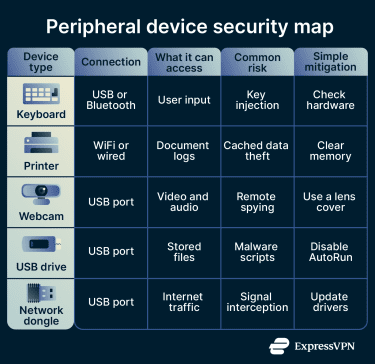
Types of peripheral devices
Peripherals can be categorized as:
- Input devices: Send user commands or real-world data to the computer. Examples include keyboards, mice, scanners, and microphones.
- Output devices: Receive data from the computer and present it to the user. Examples include monitors, speakers, printers, and projectors.
- Storage devices: Store data separately from the computer’s internal storage. Examples include external hard drives, USB flash drives, and SD cards.
- Networking devices: Enable the computer to communicate with other systems or connect to a network. Examples include Wi-Fi adapters, modems, Ethernet adapters, and Bluetooth dongles.
- Mixed devices: Handle both input and output. Examples include touchscreens (display and touch input), headsets (audio output and microphone input), and virtual reality headsets (display and motion tracking).
Why are peripheral devices important?
Peripheral devices serve several purposes:
- Customization: Users can upgrade specific features to fit their needs and preferences. For example, they might add a high-quality webcam for streaming or an external keyboard with quieter keystrokes.
- Accessibility: Specialized peripherals such as trackballs, Braille displays, and foot pedals can help people with different disabilities to operate computers effectively.
- Ergonomics: External peripherals help laptop users create a more comfortable workspace by allowing them to position screens, keyboards, and pointing devices at optimal angles, which can help reduce strain.
- Data portability: External storage devices allow users to physically transport large amounts of data between disconnected systems or create offline backups.
Risks and privacy concerns
Peripherals are useful, but they’re not risk-free. These are the main security and privacy vulnerabilities to keep in mind:
- Additional points of entry: Wireless peripherals communicate with computers via radio signals. If those connections are not securely paired and encrypted, attackers within range may intercept signals or inject their own commands.
- Malicious devices: Some USB devices are physically modified to impersonate trusted hardware. BadUSB-style attacks, for example, can make a device appear to be a keyboard and automatically issue malicious commands when it's plugged in.
- Driver flaws: Peripherals rely on driver software to communicate with the operating system. Outdated or poorly written drivers may contain vulnerabilities that attackers can exploit to gain unauthorized access or elevate privileges.
- Firmware tampering: Attackers can embed malicious code directly into a peripheral's firmware, the low-level software that controls the device's basic functions. Because firmware sits below the operating system, this type of threat can persist even after a system wipe and reinstall.
Further reading
- How to protect your phone from juice jacking attacks
- IoT vulnerabilities: How to identify and secure connected devices
- How to know if you have a hacked webcam (and how to fix it)
- How to know if your computer has a virus (Windows and Mac)
- How to know if your phone has a virus